START HERE
Time & Sales, also called the tape, lists reported market executions by time, price and size. To read it, compare the pace and location of transactions with the bid, ask and price response. A large print is information about activity, not the identity of a trader or a buy/sell instruction.
Prefer to watch? Time & Sales: why several trades become one row (1:34)
What does Time & Sales show?
Time & Sales gives a sequence of transactions. The core fields are execution time, price and size, usually expressed in contracts for futures. A platform may add a bid/ask classification, colours, filters or grouping. Check those settings before comparing two screens: their rows may represent different aggregations.
The CME Time & Sales report describes price, time and size fields and can include conditions such as corrections. A platform’s live tape is not necessarily formatted like that historical report. Read the field definitions for the data and interface you actually use.
Reference : CME Group — About Time & Sales
How to read one print before reading the whole tape
First locate the price. Then read the quantity. Finally compare the execution with the bid and ask available at that moment, if that information is available. An execution against the ask is commonly treated as buyer-initiated, and an execution against the bid as seller-initiated. Quote timing and the feed’s classification method matter; colour alone is not enough.
“Buyer-initiated” describes who sought the available liquidity. It does not tell you whether the buyer is opening a long, closing a short, hedging another position or executing part of a larger instruction. The tape does not reveal that intent.
On a small screen, scroll the table horizontally.
| Replay time | Price | Size | Example classification |
|---|---|---|---|
| 10:00:01.100 | 20,000.25 | 1 | At ask |
| 10:00:01.140 | 20,000.25 | 2 | At ask |
| 10:00:01.190 | 20,000.25 | 1 | At ask |
| 10:00:01.280 | 20,000.00 | 3 | At bid |
Why the same activity can appear as one row or several
If a display groups nearby executions at the same price and side, the first three records in the example could appear as a single row of 4 contracts. Another display could show the three records separately as 1, 2 and 1. Those are different presentations of the same total executed volume.
Grouping must not be read as proof that a single trader submitted a four-lot order. Conversely, a run of one-lot prints does not establish that all the activity came from small independent traders. Matching, feed representation and display rules all affect the visible sequence.
Before studying a session, write down whether grouping is enabled, the minimum size filter and the playback speed. Compare volumes over the same time interval instead of counting screen rows. A size filter can hide small executions even when they make up a meaningful share of total activity.
Read the pace together with the price response
A fast tape means many updates are arriving. It does not tell you by itself whether the move will continue. Watch where the trades occur and whether price advances, stalls or returns to an earlier level. The same apparent burst can have different meaning at a new session extreme and in the middle of a range.
Use a compact note rather than a prediction: “Repeated ask-side prints at the selected price, then no further upward progress during the observed interval.” This separates observable activity from the hypothesis that sellers are absorbing it. Test the hypothesis on the following sequence and record when it fails.
- Ask-side activity with price advancing: describe the executions and distance travelled.
- Ask-side activity without progress: check repeated trading and the surrounding book updates.
- Few prints and a price jump: inspect the spread and available depth; do not infer strength from distance alone.
- A rapid change of colour: verify the classification and price levels before calling it a reversal.
Use the tape alongside the DOM
The tape tells you what traded; the DOM tells you what is displayed now. A falling book quantity need not be an execution because an order can be cancelled. A stable displayed quantity need not mean no trading because orders can be replenished. That is why a screenshot of the book is weaker evidence than a sequence checked against executions.
In The Winning Curve Replay, the ladder and Time & Sales share a recorded session. Pause at an interaction and inspect both. The historical book will not react to your simulated order, so the exercise is about reading the recording rather than measuring your own market impact.
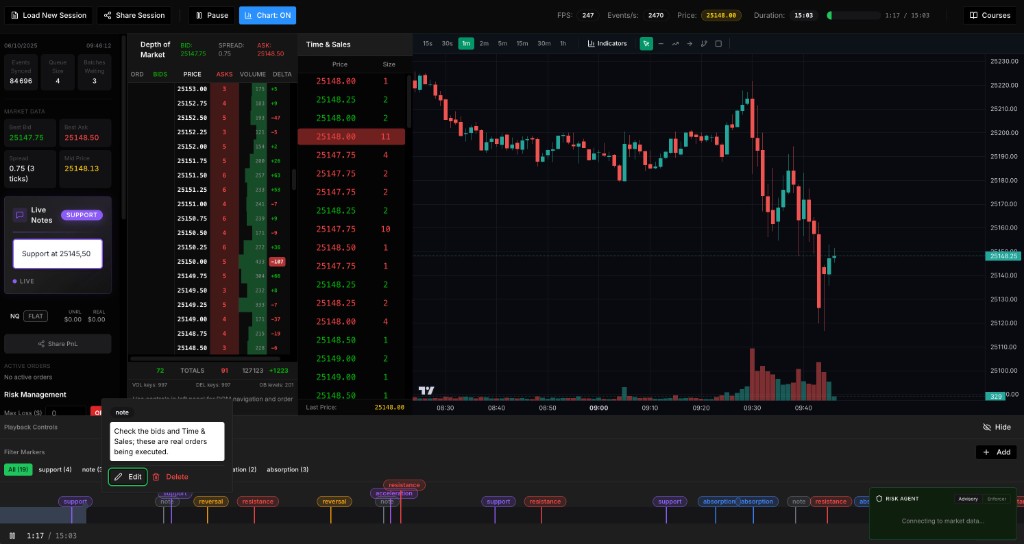
A ten-minute tape reading exercise, with answers
Start with this fictional sequence before opening Replay. Suppose three transactions at the same ask price have sizes 1, 2 and 1 contracts and your grouping rule combines them into one row. A later transaction has size 3 at the bid. The rows are separate observations; the example does not specify the next price.
Spend two minutes answering the questions, then two minutes checking the explanations. Use the remaining six minutes in the demo: choose a short interval, note its settings, pause after an observation and review the same interval once. You are practising accurate description, not finding a trade to justify.
On a small screen, scroll the table horizontally.
| Question | Answer | Why it matters |
|---|---|---|
| What size should the grouped ask row show? | 4 contracts: 1 + 2 + 1. | One row can contain several executions. |
| How much volume is described across both sides? | 7 contracts: 4 at the ask and 3 at the bid. | Do not count two displayed rows as two contracts. |
| Does the row of 4 identify one buyer? | No. | Grouping is a display rule, not participant identity. |
| Does 4 at the ask versus 3 at the bid prove the next price rises? | No; the next price is not given. | Separate executed volume from the subsequent price response. |
- In your Replay note, write the interval, grouping and size filter before interpreting the tape.
- Write one fact and one uncertainty: for example, “several ask-side executions; I have not checked the price response yet”.
- On the second pass, compare the tape with the DOM. Preserve the first note so you can see what changed in your reading.
Three habits that make the tape harder to read
Changing the size filter after every burst makes your samples hard to compare. Treat settings as part of the experiment and change one at a time. Looking only at colour hides price location. Recording only memorable large prints creates a selective picture of the session.
Keep a journal of ordinary interactions too. A quiet level, a failed interpretation and an unchanged spread can be useful observations. You are building a consistent reading process, not collecting screenshots that prove a view you already hold. Tape-reading practice and simulated results do not establish a profitable live strategy.
Common questions
Why does my Time & Sales show many one-lot trades?
The feed may report executions separately and the interface may display them without aggregation. One-lot rows do not establish the size of each participant’s full order. Compare the total volume and grouping settings.
Does green always mean buy and red always mean sell?
No universal colour convention identifies intent. Many platforms colour by bid/ask classification, while others may use price changes or custom rules. Check the legend and settings for your display.
Is Time & Sales better than the DOM?
They answer different questions. Time & Sales shows reported executions; the DOM shows visible resting liquidity. Comparing both is more informative than treating either as a complete account of the market.
Can a big print identify an institution?
Not from the public tape alone. A reported size does not disclose the participant, account structure, motivation or complete parent order.
Published by The Winning Curve. Invented examples are labelled; screenshots show our interface. A correction or question about this guide? thewinningcurve@gmail.com
