DOM: displayed quantities
The order book groups bid and ask quantities by price. A displayed quantity can change or be withdrawn: its presence does not mean a trade has taken place.
THE PRACTICE TOOL INCLUDED IN THE COURSE
DOM Replay is an order flow replay simulator for practising on recorded market sessions. Try an NQ session in your browser without an account or installation: watch the DOM, Time & Sales and chart, pause playback and try simulated orders. The full practice tool is included in the order flow course.
Recorded session · Simulated orders · No account required
TRY IT WITHOUT AN ACCOUNT
Watch the order book, pause and try a simulated order. The course helps you understand what you see.
UNDERSTAND WHAT YOU SEE
The DOM (Depth of Market), Time & Sales and chart answer three different questions. Replay lets you observe them over the same sequence, then watch it again.
The order book groups bid and ask quantities by price. A displayed quantity can change or be withdrawn: its presence does not mean a trade has taken place.
The tape shows trades with their price, time and quantity. Compare executions with the book to distinguish what was displayed from what actually traded in the recorded session.
The chart provides context. Observe whether trades accompany a price move or repeat around the same level. A single number in the book cannot explain the whole sequence.
More on market data: order book depth · Time & Sales (CME Group).
YOUR FIRST EXERCISE · 5 MINUTES
The aim is to recognise the information and get familiar with the tool. Your orders are simulated and are never sent to a broker.
Open the demo without an account. It replays September 25, 2026, from 10:00 to 10:15 New York time. Begin by watching a short sequence without placing an order.
Find the best bid, the best ask and a recent Time & Sales trade. Distinguish the quantity still displayed in the book from the quantity already traded.
Restart and slow playback if needed. Watch additions, withdrawals and trades, then the price movement. Record what you observe before looking for an explanation.
Set quantity to 1 to explore the controls. BUY MKT or SELL MKT opens a simulated position; FLATTEN closes it. Explore MaxLoss and the session review too. Restart clears this trial’s orders, results and notes.
Which level did you watch? What trades did you see there? Did the price move? Your observations, rather than simulated PnL, are the review for this first exercise.
YOUR PRACTICE WORKSPACE
The chart and Time & Sales complement the DOM. Risk settings and the session review help you revisit your decisions in simulation.
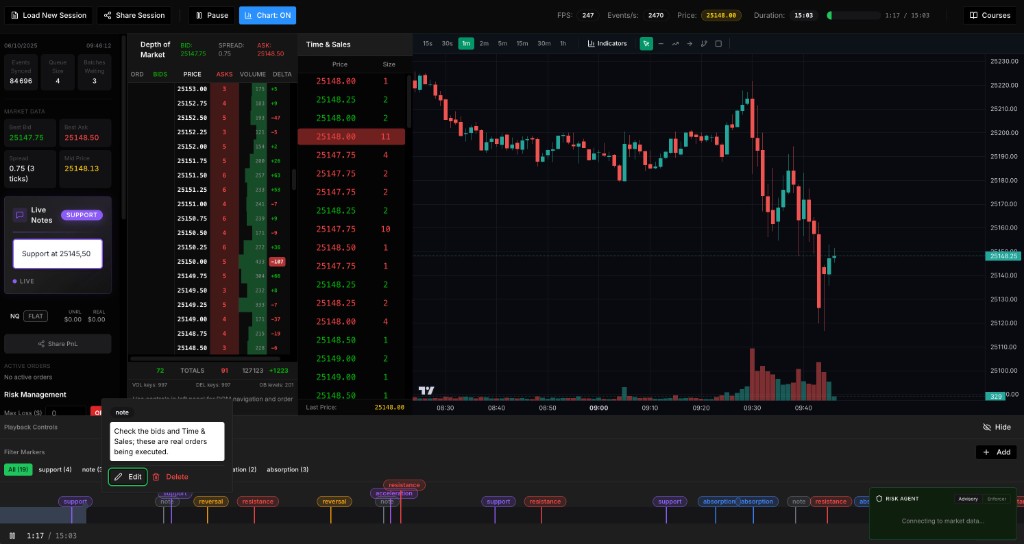
Watch price levels and trades, then try simulated orders. The demo loads one NQ session; practice covers NQ and ES.
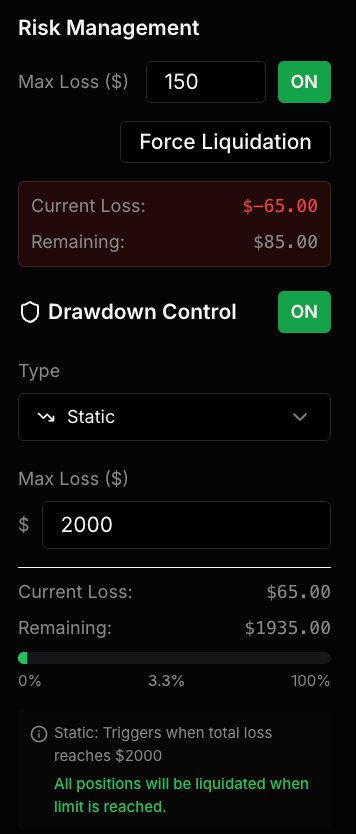
Set limits and observe their effect on your session. These practice settings do not guarantee compliance with a prop firm’s rules.
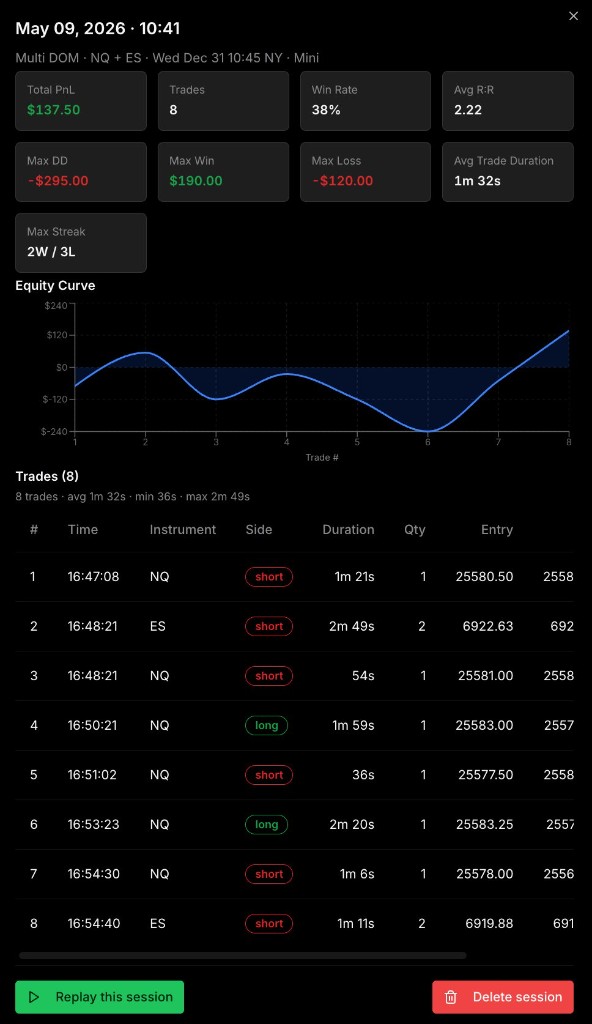
Revisit your trades and session. The figures in this screenshot are an example from a simulation.
REPLAY AND REAL MARKETS
The data comes from a recorded session. Orders in the demo are simulated: they are not sent to a broker and do not alter the historical order book. Fills do not reproduce every liquidity, queue-priority or latency constraint of real execution.
Explore what changes with DOM Live →READ · OBSERVE · PRACTISE
Learn how the DOM, bid, ask and Time & Sales work together. A worked order flow example, absorption explained and a five-minute Replay exercise.
Read the guide →Learn to read the futures tape: price, size and grouped prints. Try a worked Time & Sales exercise with answers, then practise in the free NQ Replay.
Read the guide →A step-by-step NQ futures replay exercise with a free demo, hypothetical tick-risk calculation, MaxLoss checklist and downloadable practice journal.
Read the guide →Learn the difference between order flow absorption and exhaustion with a fictional worked example, a Replay exercise and a checklist for uncertain signals.
Read the guide →Compare market replay and paper trading for futures practice: data, simulated fills, hindsight bias and a learning plan with a free NQ Replay demo.
Read the guide →YOUR QUESTIONS
The demo replays recorded trades and order-book snapshots with 20 levels per side, alongside the session chart. Compare displayed DOM quantities with Time & Sales executions. It includes more than a replay of chart candles.
The public demo uses the NQZ6 contract on September 25, 2026, from 10:00 to 10:15 New York time. The fixed session lets you restart and compare observations. Practice offered with the course covers NQ and ES.
Yes. Replay reads an already recorded session, so you can observe, pause and restart without waiting for the market to open. The displayed date and time belong to the recording, not a live feed.
No. In this demo, Mini/Micro scales the PnL calculation on the same NQ recording. Micro mode does not replace the data with a separately recorded MNQ order book.
The NQ demo is free, with no account or installation. The full offer combines the DOM course and Replay tool in a one-time purchase with lifetime access. DOM Live remains a separate beta by request.
Orders and maximum-loss settings are for practice. No order is sent to a broker and your actions do not change the historical book. Simulation does not reproduce every execution constraint or guarantee profitability or compliance with a prop firm’s rules.
COURSE + REPLAY INCLUDED